How RAG Answers From Your Own Documents
Learn how RAG searches your documents, where retrieval breaks, and how to choose chunks, embeddings, and a similarity floor.
You have a folder full of policies, support answers, or product documents and want an AI to answer from them. The hard part is not adding a chat box. It is deciding which passages the model is allowed to see, and refusing when the search finds nothing useful.
RAG, or retrieval-augmented generation, searches your documents before the language model writes an answer. It is worth building when the files are too large or too changeable to paste into one prompt, and when a wrong answer needs a source a person can check.
| Use this | When it fits | Example |
|---|---|---|
| A chat window | The documents fit in one prompt, rarely change, and someone can check the answer. | A small policy or project brief. |
| RAG | The corpus is larger, changes over time, or needs searchable source passages. | Support history, product documentation, or internal policies. |
In this guide, I'll show you how RAG loads documents, turns them into searchable embeddings, stores the source text beside those vectors, and sets a similarity floor. I use my own Postgres and pgvector setup for the code examples, then compare the pattern with a production system at Pinterest.
The buzzwords guide translated the word for this, RAG, and has the table comparing pasting a document in against searching it. This one builds the pipeline.
A business case: Pinterest's table search
Pinterest built RAG into Querybook, its internal structured query language (SQL) tool, because analysts had to find the right tables before an AI could write useful SQL. The system embeds summaries of tables and past queries, searches those summaries, then lets a large language model (LLM) narrow the candidates before the user confirms them. [9]
After the feature reached production, Pinterest's first-shot acceptance rate for generated SQL rose from 20% to above 40%. The team also reported a 35% improvement in task-completion speed, with the caveat that the real-world tasks were not controlled for difficulty. [9]
That is the business value of retrieval: it can remove the table-finding step before it tries to generate an answer. The same pattern applies to policies, support history, product documentation, and any other corpus where the hard part is finding the right source.
How does AI answer from your own documents?
It searches them first. Your files get cut into passages, which are chunks of source text such as paragraphs or sections. Each passage becomes a list of numbers, and those numbers are stored so a search can rank by meaning instead of by keyword.
Ask a question and the closest few passages go into the prompt. The model answers out of those passages.
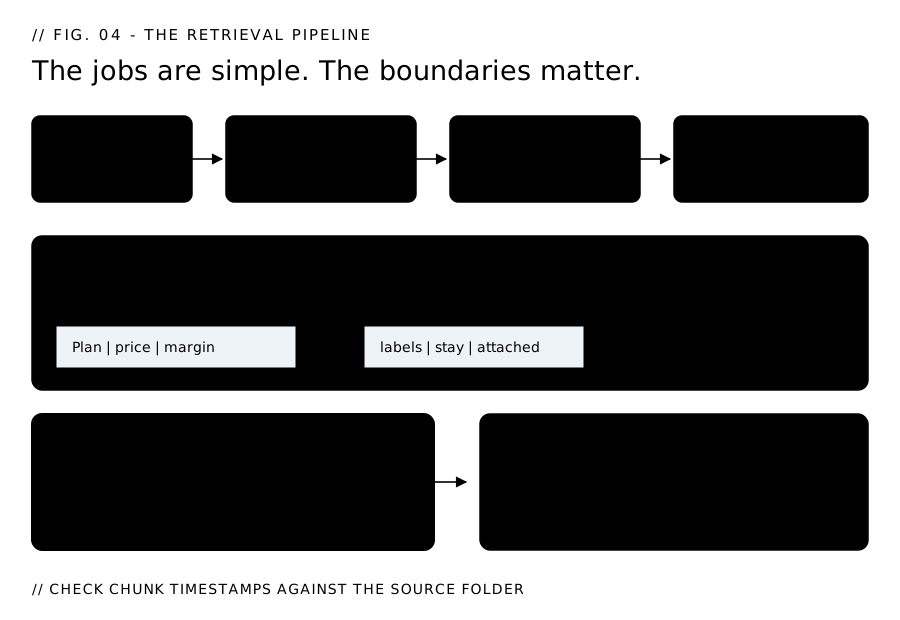
A semantic RAG system usually has four jobs:
- A loader reads your files and divides them into chunks.
- An embedder turns each chunk into a fixed-length list of numbers.
- A store keeps the chunks and their embeddings, then returns the closest matches.
- A prompt builder places those passages into the model request with instructions for using them.
Products package these jobs differently. Some add keyword search, reranking, or managed storage. Others hide the loader and embedder completely. These four jobs give you a way to inspect what a semantic RAG product is doing underneath the interface.
In this pipeline, chunking is where retrieval quality starts to break. My loader keeps paragraphs together up to 1,500 characters, then carries the last 200 characters into the next chunk so a thought cut at a boundary appears in both.
A character-only loader can split a price table from its header. The numbers still get embedded and ranked, but the retrieved passage no longer says what those numbers mean.
Something to check today. Compare the timestamp on the newest chunk in your index with the newest file in the folder it reads. If the chunk is months older, the model can retrieve a policy or product detail you already changed and present it as current.
Wire an incremental re-index when source files change, or record the source version beside each chunk and refuse to answer from stale ones.
What does that look like in a real database?
Postgres is the database; pgvector is its extension for storing and searching vectors. In this setup, Postgres 16 has pgvector switched on. One table named chunks holds the passage text with a vector(1024) column beside it.
A unique constraint on (document_id, chunk_index) keeps a re-run from storing the same passage twice. A Hierarchical Navigable Small World (HNSW) index on that column using vector_cosine_ops is what makes the search fast.
CREATE TABLE chunks (
    id          uuid PRIMARY KEY DEFAULT gen_random_uuid(),
    document_id uuid NOT NULL REFERENCES documents (id) ON DELETE CASCADE,
    chunk_index int  NOT NULL DEFAULT 0,   -- order within its document
    content     text NOT NULL,             -- the passage a person can read
    embedding   vector(1024) NOT NULL,     -- must match what the embedder emits
    UNIQUE (document_id, chunk_index)      -- re-run the loader, get no duplicates
);

CREATE INDEX chunks_embedding_hnsw
    ON chunks USING hnsw (embedding vector_cosine_ops);
Three things in there do real work:
- The text sits in the same row as the numbers. Nobody can read 1,024 floats. Keeping
contentbesideembeddingis what lets you open the source passage and check the answer against it. - The unique constraint is the duplicate guard. Run the loader twice without it and every passage has a twin. Both come back, and the model reads the same paragraph as two independent sources.
vector_cosine_opspicks the distance measure. OpenAI's docs recommend cosine outright, and it's the standard pairing for the kind of normalized text embeddings this pipeline stores.
I left the index tuning alone. pgvector defaults m to 16 and ef_construction to 64. [1] Around 100,000 chunks, measure search latency and whether the right passages still appear before changing those settings. Until then, the defaults keep this first build simple.
Which embedding model fits your setup?
Ollama is a local model server. Mine runs bge-m3 on it, a multilingual embedding model that emits 1,024 numbers per passage and reads up to 8,192 tokens. [2][3] Every embed costs $0 and the text stays on the machine, which is why I chose this path for company documents.
| Embedder | Dimensions | Indexes in pgvector | Cost | Where your text goes |
|---|---|---|---|---|
bge-m3 on Ollama |
1,024 | Plain vector |
$0 | Stays on your machine |
Qwen3-Embedding-0.6B (Ollama) |
up to 1,024 | Plain vector |
$0 | Stays on your machine |
voyage-4-lite |
1,024 (default) | Plain vector |
Metered per token | Voyage's servers |
text-embedding-3-large |
3,072 | Needs halfvec |
Metered per token | OpenAI's servers |
These are representative options, not a market-share ranking. Choose based on where the text can go, what your index can hold, and whether you want to operate the model yourself:
bge-m3on Ollama: Choose this pairing when Ollama's local boundary matters, and you wantbge-m3's multilingual coverage at the 1,024-dimension width used in this guide.Qwen3-Embedding-0.6Bon Ollama: Choose this when you want a small local model with an output dimension you can set up to 1,024, and the Apache-2.0 license fits your project.voyage-4-lite: Choose this when you want hosted embeddings with selectable dimensions and the default 1,024 width lets you keep the schema used in this guide.text-embedding-3-large: Choose this when OpenAI's hosted embedding service fits your stack and you want its 3,072-dimension default; plan to usehalfvecor the API'sdimensionsparameter before creating the index.
Count what your embedder emits before anyone creates the column. Ollama answers on POST /api/embed: [4]
# Ask the local model for one embedding and count the numbers in it.
curl -s http://localhost:11434/api/embed \
  -d '{"model": "bge-m3", "input": "how do refunds work"}' \
  | python3 -c "import json,sys; print(len(json.load(sys.stdin)['embeddings'][0]))"
# 1024   <- this is the N that goes in vector(N)
Why does 1024 keep showing up?
Four embedders land on exactly that number: bge-m3, Qwen3-Embedding-0.6B, voyage-4-lite and voyage-4. [2][5][6] Using 1,024 as the shared width means you can move to hosted Voyage or a stronger local model without changing the vector column.
An embedding is a list of values. Its dimension is the length of that list: a 1,024-dimensional embedding contains 1,024 values. The scale below shows how those widths relate to pgvector's index and storage limits. IVFFlat, short for inverted file with flat quantization, is one of the index types shown.
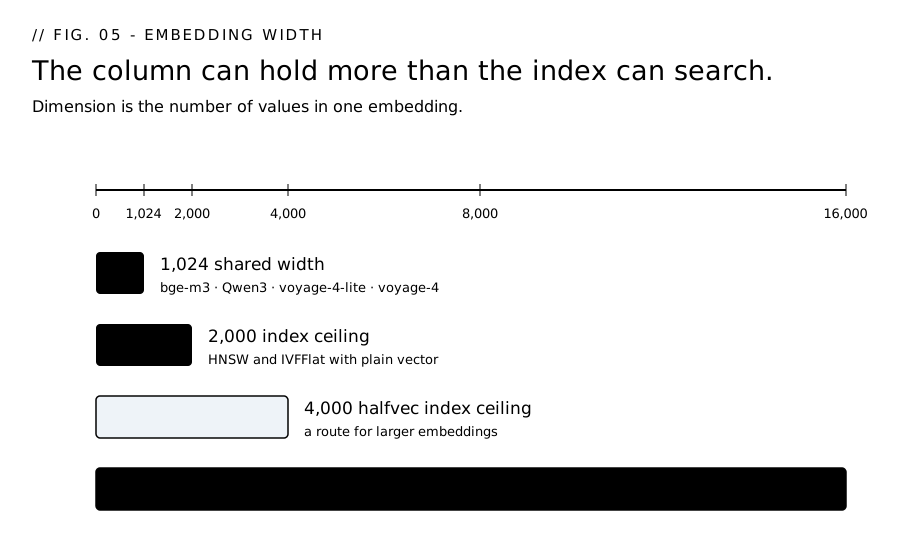
The width is fixed the moment you run CREATE TABLE. A vector(1024) column takes 1,024 numbers and rejects anything else.
If an evaluation shows that hosted Voyage or another local model fits your workload better, the shared width lets you change the provider and model settings without changing the vector column or index definition. You still have to re-embed every passage, because vectors from different models cannot be mixed.
A model with a different width adds a column migration to that re-embedding work.
# .env — the embedder is chosen here, never in the schema
EMBEDDING_PROVIDER=ollama              # ollama | voyage
EMBEDDING_MODEL=bge-m3                 # ollama: bge-m3 | voyage: voyage-4-lite
OLLAMA_BASE_URL=http://localhost:11434 # only the local path reads this
pgvector has two size limits and they are different numbers.
- A
vectorcolumn stores up to 16,000 dimensions. [1] - Hierarchical Navigable Small World (HNSW) and inverted file with flat quantization (IVFFlat) indexes only support up to 2,000 of them. [1] Above that the column still holds your data, and every search reads every row.
text-embedding-3-large emits 3,072 dimensions. [7] It fits in a plain vector column, but not in a standard HNSW or IVFFlat index. Starting with it means choosing halfvec, shortening the embedding with OpenAI's dimensions parameter, or accepting an unindexed search.
What halfvec is. A second pgvector column type that stores each number as a half-precision float: 16 bits instead of 32, 2 * dimensions + 8 bytes per row against 4 * dimensions + 8 for a plain vector. [1] Indexes accept it up to 4,000 dimensions. [1] You can also leave the column alone and cast at index time:
-- index a 3,072-dim column by casting it down to half precision
CREATE INDEX ON chunks USING hnsw ((embedding::halfvec(3072)) halfvec_cosine_ops);
Using halfvec or changing the embedding representation introduces three tradeoffs:
- Precision. Every number gets rounded to the nearest 16-bit float. Rankings move a little. How much depends on your data, and nobody can tell you the number without measuring on yours.
- A column change. Either the type migration or the cast above, on a table you have already filled.
- A re-embed, usually. Not for the cast itself. But the reason you are here is a 3,072-dim model, and moving to a different model means embedding every passage again from scratch.
Some hosted embedding services let you request a shorter vector before it reaches your database. OpenAI exposes that choice through its dimensions parameter. [7] Check whether your provider offers the same option before you create the column.
Ask what width a vendor's embedder emits and whether their index can hold it.
What does changing the embedding model cost you?
Every passage you have stored, embedded again. Embeddings from different models are not comparable, so a table holding both can produce meaningless similarity rankings. A model with a different output width means re-creating the column on top of that.
The lock-in: products that store proprietary embeddings, including hosted ones, make a model change an expensive re-embedding job.
Before you choose an embedding provider, get two answers in writing:
- Which embedding model, and what dimension? Get the model name in writing. "An industry-standard embedding model" is not an answer.
- What does embedding my whole corpus cost, in hours and in dollars? You pay that bill twice. Once on the initial load, before a single question works, and again the day anybody changes the model. Get both numbers before you sign.
What stops a weak match?
A hallucination is a confident answer built on invented facts. The buzzwords guide covers the $5,000 sanction in the Mata v. Avianca case.
Retrieval narrows the risk by putting real source-text chunks in front of the model. It cannot remove hallucinations. A nearest-neighbour search can return a weak match, and the model can turn that weak evidence into a polished answer that sounds trustworthy.
When vector search returns a result, that result contains a chunk of source text, its cosine similarity score, and a document_id. Put the text and score into the model's context, so a 0.91 and a 0.34 arrive labelled. Use the ID to look up the stored document, then open the source file before accepting the answer.
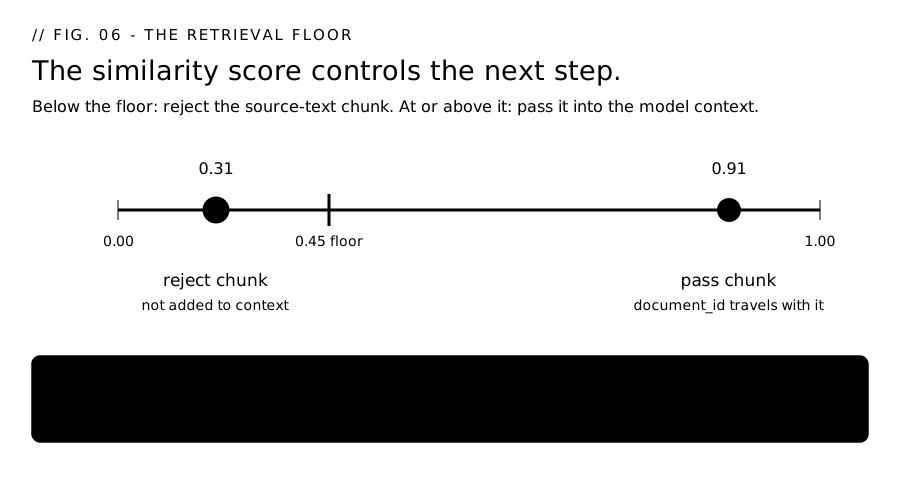
The control is the similarity floor, the minimum score a source-text chunk has to clear before the application passes it into the model's context. Scores below the floor are rejected. Scores at or above it move forward with their source IDs.
Choosing that floor is measurement work. I split the calibration workflow into its own guide: how to choose a retrieval cutoff.
A retrieval floor is a refusal rule
If a retrieval query only says ORDER BY distance LIMIT 5, an unrelated question still gets the least-unrelated rows in the table. If the runner treats an empty result as the only no-answer state, a weak match goes through as evidence.
The score has to control the next step. A 0.31 should not reach the prompt as evidence in the same way as a 0.91. The refusal needs to happen before the model writes a plausible sentence out of nothing related.
In this pipeline, memory/client.py::search_chunks carries that floor:
SELECT content, 1 - (embedding <=> %s) AS similarity
FROM chunks
WHERE 1 - (embedding <=> %s) >= %s   -- the floor. Default 0.45.
ORDER BY embedding <=> %s
LIMIT %s
The 0.45 floor serves a different purpose from the 0.70 duplicate threshold. The 0.70 separates repeated ideas from different observations. Search needs to keep related material, so the floor sits below the 0.59 to 0.62 range from that calibration.
The 0.45 floor rejects plainly unrelated source-text chunks while keeping related ones. A higher floor can hide a useful source without telling you why the answer is empty. Raise or lower MEMORY_RETRIEVAL_FLOOR only after measuring it against your own questions.
When source lookup fails, refuse the answer. "I couldn't read the source" means the system stops.
When is a chat window the better choice?
Use a chat window when all three are true:
- The documents fit in one prompt.
- They rarely change.
- The person asking can spot a bad answer.
If you paste the same text often, prompt caching can make that cheaper. I cover that part in the buzzwords guide.
While all three are true, a chat tab is enough.
Move to retrieval when one of them breaks:
- The documents no longer fit. Now somebody has to decide which parts of the documents the model sees.
- The files change often. A pasted copy goes stale the day you edit the original.
- The reader cannot check the answer. That is when a wrong answer can travel.
Before you point anything at that folder, count the files in it that contradict each other. Retrieval over three versions of one policy returns all three, ranked by closeness, with nothing on them marking which is live. Move the dead ones somewhere the loader can't reach, or the index goes on offering them.
Retrieval on its own answers a question. Turning that into a system that acts, files a ticket, or updates a record is a different decision, covered in when to use AI agents instead of one prompt.
What changes when this gets bigger?
The first problems are not exotic database problems. They are ordinary content problems that get harder to see once the folder is large.
The index has to stay fresh. A RAG system is only as current as the text it indexed. If the folder changes weekly, the loader has to run weekly too, or the model can answer from old information while sounding current.
Old and new documents start contradicting each other. A draft policy, a retired price sheet, and the live version can all look relevant to the search. Move old files out of reach, or store enough status metadata to tell the retriever what is still valid.
Every change needs a test set. Keep a small set of real questions and expected source files. Re-run it when you change the chunk size, the embedding model, or the retrieval floor. Otherwise you are judging the new setup by whether one demo question feels right.
Model changes become migrations. Switching embedders means embedding the whole corpus again. If the new model emits a different number of dimensions, the database column and index may change too.
Quick Recap
- Use a chat window when the documents fit, rarely change, and the person asking can check the answer.
- Use RAG when the folder is larger, changes over time, or needs source-backed answers.
- A RAG system has four jobs: a loader, an embedder, a store, and a prompt builder.
- Keep the source text beside the embedding. The numbers find the match; the text lets a person check it.
- Choose the embedding width before you create the column. My setup uses
vector(1024)withbge-m3on Ollama. - Changing models means re-embedding the corpus. A different dimension can also mean a column or index change.
- Weak matches need a floor. Scores below it should be refused before the model writes an answer.
- As the folder grows, freshness matters more. Old documents, missing re-indexes, and untested changes are where the system starts drifting.
Start Here
You can follow every step here and still not know whether your business needs it yet, or which folder to point it at first.
The intake at daisyguti.ai/work-with-me is about nine questions and takes a few minutes, held as a live conversation with an AI. It turns your answers into a brief with the specifics that matter: what you're trying to solve, what you've already tried, what a working version looks like to you.
I read that and reply with whether a document-answering system like this, or a custom workflow automation, would fit.
Sources
- pgvector, open-source vector search for Postgres - https://github.com/pgvector/pgvector - "Vectors can have up to 16,000 dimensions"; HNSW/IVFFlat support
vectorup to 2,000 dimensions andhalfvecup to 4,000; "Each vector takes4 * dimensions + 8bytes of storage... single-precision floating-point number" against "Each half vector takes2 * dimensions + 8bytes... half-precision floating-point number"; HNSW defaults arem16 andef_construction64;vector_cosine_opsis the cosine operator class. - BAAI/bge-m3 model card, Hugging Face - https://huggingface.co/BAAI/bge-m3 - "Dimension: 1024", "Sequence Length: 8192", "License: mit", "more than 100 working languages".
- bge-m3 on Ollama - https://ollama.com/library/bge-m3 - the local model server used here; 567M parameters, 1.2GB download, inputs up to 8,192 tokens.
- Ollama embeddings endpoint - https://docs.ollama.com/api/embed -
POST /api/embedtakes{"model", "input"}and returns{"embeddings": [[...]]}. - Voyage AI embeddings documentation - https://docs.voyageai.com/docs/embeddings - voyage-4, voyage-4-lite and voyage-4-large default to 1,024 dimensions, with 256, 512, 1,024 and 2,048 selectable.
- Qwen3-Embedding-0.6B model card, Hugging Face - https://huggingface.co/Qwen/Qwen3-Embedding-0.6B - output dimensions from 32 to 1,024, Apache-2.0 license.
- OpenAI embeddings guide - https://developers.openai.com/api/docs/guides/embeddings - "the length of the embedding vector is 1536 for text-embedding-3-small or 3072 for text-embedding-3-large", shortenable via the
dimensionsparameter. - Pinterest Engineering, "How we built Text-to-SQL at Pinterest" - https://medium.com/pinterest-engineering/how-we-built-text-to-sql-at-pinterest-30bad30dabff - first-shot acceptance rose from 20% to above 40%; the team reported a 35% improvement in task-completion speed; the RAG iteration indexed table summaries and past-query summaries to find relevant tables before SQL generation.